XAMPP issue in Window Port 80 in use by “Unable to open process” with PID 4!
If you are a PHP developer, PHP developer and having a still an issue in exam. localhost PHPmyadmin. XAMPP issue in Window Port 80 in use by “Unable to open process” with PID 4! If you are a PHP developer, PHP developer and having a
Quick overview
| Field | Detail |
|---|---|
| Topic | mysql |
| Guide | XAMPP issue in Window Port 80 in use by “Unable to open process” with PID 4! |
| Tags | mysql, port, apache, error, issue, need |
| Length | About 352 words |
| Practice rule | Authorized labs only — stay ethical |
If you are a PHP developer, PHP developer and having a still an issue in exam. localhost PHPmyadmin.
XAMPP issue in Window Port 80 in use by “Unable to open process” with PID 4!
If you are a PHP developer, PHP developer and having a still an issue in exam. localhost PHPmyadmin.
The issue can be defined on live server but on localhost window user the error can be same. By following few steps you can solve out this problem.\
Before understanding of localhost troubleshooting with MySQL and Apache server.
 Problem detected!
12:41:58 PM  [Apache]  Port 80 in use by "Unable to open process" with PID 4!
12:41:58 PM  [Apache]  Apache WILL NOT start without the configured ports free!
12:41:58 PM  [Apache]  You need to uninstall/disable/reconfigure the blocking application
12:41:58 PM  [Apache]  or reconfigure Apache and the Control Panel to listen on a different port
12:41:58 PM  [mysql]  Problem detected!
12:41:58 PM  [mysql]  Port 3306 in use by "Unable to open process"!
12:41:58 PM  [mysql]  MySQL WILL NOT start without the configured ports free!
12:41:58 PM  [mysql]  You need to uninstall/disable/reconfigure the blocking application
12:41:58 PM  [mysql]  or reconfigure MySQL and the Control Panel to listen on a different port
or Error Can be
1:45:40 PM  [mysql]  Error: MySQL shutdown unexpectedly.
1:45:40 PM  [mysql]  This may be due to a blocked port, missing dependencies,
1:45:40 PM  [mysql]  improper privileges, a crash, or a shutdown by another method.
1:45:40 PM  [mysql]  Press the Logs button to view error logs and check
1:45:40 PM  [mysql]  the Windows Event Viewer for more clues
1:45:40 PM  [mysql]  If you need more help, copy and post this
1:45:40 PM  [mysql]  entire log window on the forums
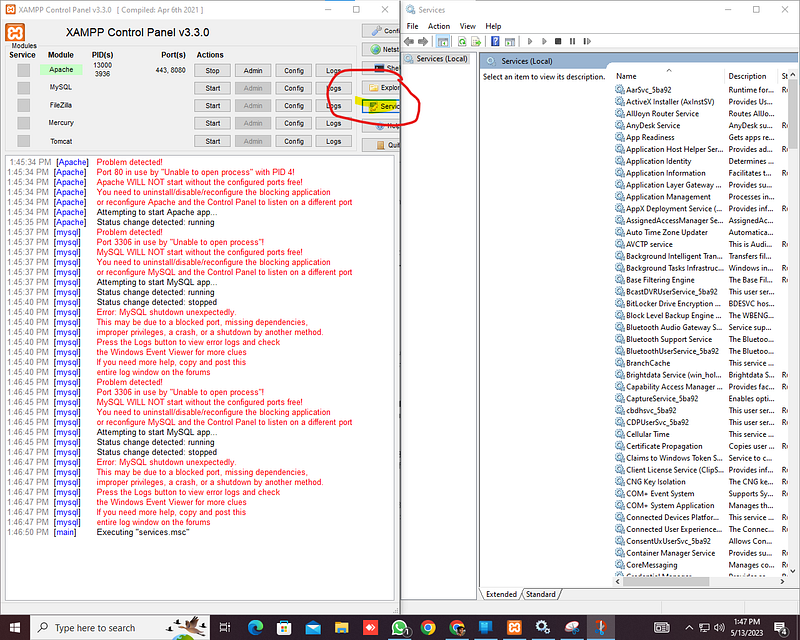
Open XAMPP go to Servius the you will find the system will be using SQL on 80 port
 BICODEV
you just need to go and Stop this iS MYSQL ON 80 by Dabble Clinking on
Reason
The error is Coming on The area Because there is Multiple Sql is running on server :
Solution
you just need to go and Stop this is MYSQL ON 80 by Dabble Clinking on
Donate
Frequently asked questions
What is this guide about mysql?
XAMPP issue in Window Port 80 in use by “Unable to open process” with PID 4! explains practical, ethical notes on mysql. Use it as a structured walkthrough — then practice only in authorized labs.
Who is this mysql article for?
Readers who want clear, street-level guidance on mysql without hype. Beginners and intermediate practitioners both benefit.
How do I practice mysql safely?
Stay in scope: systems you own or have written permission to test. Keep notes, verify findings, and never attack live targets without authorization.